Expect to pay somewhere between $2 and $12 a month for a small, vanilla 10-player server, with modded setups, public communities, or dedicated hardware pushing well past $150. RAM is the single biggest lever on that bill: a 10-player vanilla world runs comfortably on about 4 GB, while the same player count with a heavy mod pack can demand 6 to 10 GB and a noticeably bigger invoice.
TL;DR:
- A basic 10-player vanilla Minecraft server costs between $2 and $12 monthly, with RAM being the primary cost factor; modded servers require significantly more RAM and cost more accordingly.
- Hosting costs scale with player count, from roughly $2 to $6 for 1 to 5 players, to $15 to $40 for 10 to 25 players, and can exceed $90 for large communities with heavy mod packs or dedicated hardware.
- RAM dominates the billing, with each additional 1 to 2 GB adding around $2.55 per month, and CPU performance is crucial for modded servers that rely on single-threaded processing.
- Upgrading to better infrastructure (such as dedicated or high-performance VPS hosting) becomes necessary once support for more than 25 players is needed, often increasing monthly costs significantly.
- Cost-efficient strategies include sizing plans to peak concurrent players, using optimized server software, and leveraging community funding to cover hosting expenses.
Table of Contents
- How Much Does Minecraft Server Hosting Cost Each Month?
- What RAM and Budget Do You Need for Your Player Count?
- What Factors Actually Drive the Price Up?
- Which Hosting Approach Actually Fits Your Budget?
- How Do You Actually Cut Your Hosting Bill?
- Why Performance and Protection Matter as Much as Price
- Are There Hidden Setup Fees You Should Watch For?
- Does Support Quality Change What You Pay?
- What Happens to Cost as Your Server Grows Past 25 Players?
- Balancing Cost and Player Experience
- Which Nexonixhost Plan Matches Your Server's Budget?
- Sources
- FAQ
How Much Does Minecraft Server Hosting Cost Each Month?
Every price you'll see attached to a Minecraft server maps back to three things: how much RAM the plan hands you, how many players it's built to support, and whether the box is shared with strangers or reserved just for you. Once you understand that mapping, the pricing pages stop looking random.
Self-hosting looks free at first glance, since you're just running the server software on a machine you already own. It isn't. You're paying in electricity, in a router that needs port forwarding, in an internet connection that has to stay up around the clock, and in the time you'll spend troubleshooting when the world corrupts at 2 a.m. Building a dedicated home rig for hosting can run $1,000 to $2,000 upfront, before a single kilowatt-hour hits your electric bill.
Budget shared hosting is where most small groups land first. These plans typically offer 1 to 4 GB of RAM, cap you at somewhere between 5 and 20 slots, and price out from roughly $2 to $12 a month for the low end of that range. You're sharing physical hardware with other customers, which keeps the price down but means a noisy neighbor's spike in usage can occasionally slow your world.
VPS hosting is the next rung up, and it's where price starts scaling with resources instead of just slot count. A VPS gives you a virtualized slice of a server with guaranteed RAM and CPU cores, so a plan built around 4 GB behaves very differently from one built around 16 GB. Expect the monthly band for VPS hosting to start in the low single-digit dollars and rise into the tens of dollars as you provision more RAM and dedicated CPU cores for modded packs or larger player bases.
Dedicated and high-performance hosting sits at the high end of the range, generally costing significantly more depending on hardware specifications and features. This tier makes sense once you're running a public server with dozens of concurrent players, several resource-heavy plugins, or a community that treats downtime as a personal insult.
A useful way to sanity-check any quote is price per gigabyte of RAM. Industry benchmarking puts the average game server plan around €29.02 a month with a median near €19.99, and roughly €2.55 per GB of RAM is a fair reference point for comparing value across providers.
Representative examples, stripped of brand names, look like this:
- ~$3 to $5/month, 1–2 GB RAM: fine for a 2 to 5 player vanilla world among close friends.
- ~$6 to $12/month, 4 GB RAM: the sweet spot for a 10-player vanilla server.
- ~$15 to $30/month, 6–8 GB RAM: a small modded server or a busier vanilla community.
- ~$40 to $60/month, 8–16 GB RAM, dedicated cores: an active modded server or a public server with 20+ regulars.
- $90+/month, dedicated hardware: large public communities, heavy plugin stacks, or anything running multiple worlds at once.
What RAM and Budget Do You Need for Your Player Count?
Player count is the first number you should decide before you ever open a pricing page, and it drives almost every other decision after it.
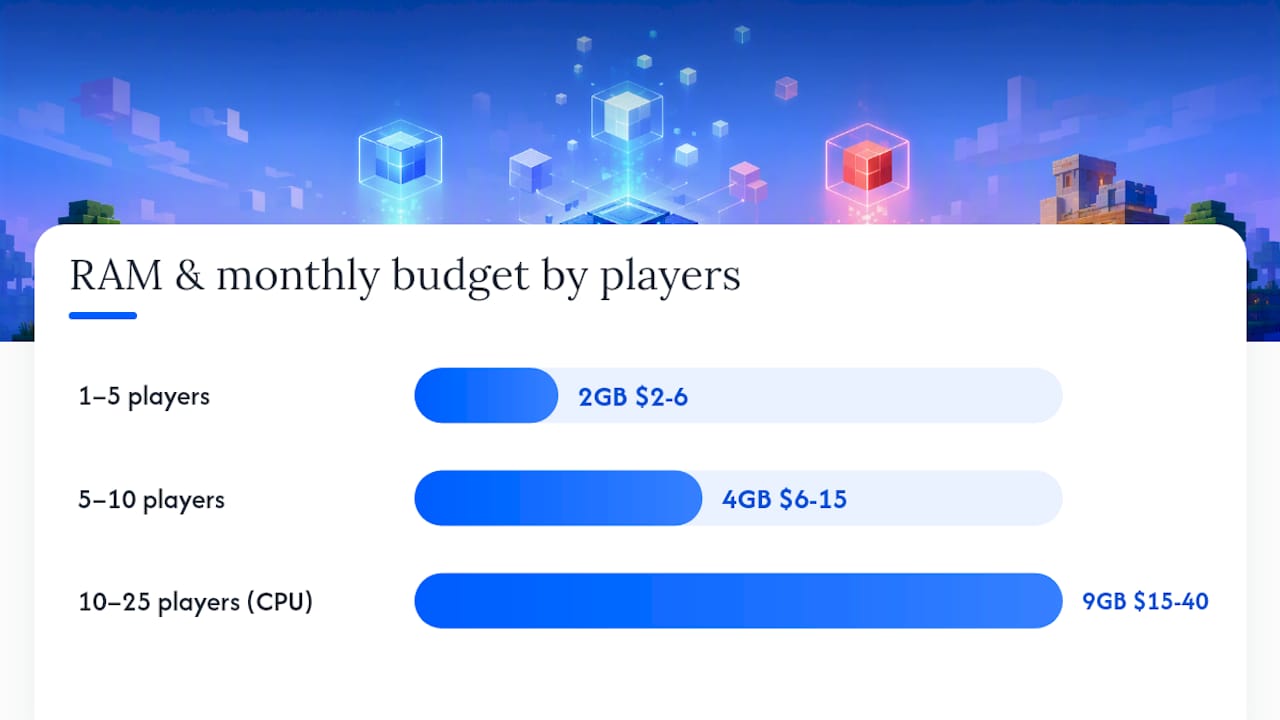
1. For 1 to 5 players, 2 GB of RAM is usually enough for a vanilla survival world, and you'll typically pay somewhere in the $2 to $6 a month range on a budget plan. If everyone in the group already owns a decent gaming PC, self-hosting is genuinely viable here. The group is small enough that occasional downtime is an inconvenience, not a crisis, and the electricity cost of running one PC part-time is trivial.
2. For 5 to 10 players, 4 GB of RAM tends to be the practical minimum, and it's genuinely the sweet spot for this range. Vanilla Minecraft's chunk loading and entity tracking scale with active players faster than most people expect, and a server that felt snappy at 4 players can start hitching once 8 or 9 are online simultaneously, all triggering separate chunk loads. Budget for roughly $6 to $15 a month at this tier.
3. For 10 to 25 players, you're now looking at 6 to 12 GB of RAM and you need to start paying attention to CPU as well, not just memory. Minecraft's server tick loop is largely single threaded, so a plan with more cores doesn't help nearly as much as a plan with faster individual cores. Expect a price band of roughly $15 to $40 a month depending on whether you're on shared hosting or a VPS with guaranteed resources.
4. For modded servers, plan on 2 to 3 times the RAM you'd need for the same player count running vanilla. A mod pack loaded with custom dimensions, complex machinery, and dozens of new entity types puts far more load on both memory and CPU than plain survival. A 10-player modded server that would need 4 GB vanilla often needs 8 to 12 GB modded, and the monthly cost typically rises in step, landing somewhere between $20 and $50 depending on the pack's weight.
5. Watch for the warning signs that you've outgrown your current plan: consistent lag when several players are active at once, server crashes tied to memory errors in the console log, and chunk loading that takes noticeably longer than it used to. Any one of those, especially memory errors, is usually a sign to move up a RAM tier before the problem gets worse, not after.
What Factors Actually Drive the Price Up?
RAM is the dominant cost driver for Minecraft hosting, full stop. Engineering cost models for real-time game servers consistently show memory allocation as the single biggest line item, because Minecraft loads entire chunks, entities, and inventories into active memory rather than streaming them selectively. Double your player count and you're likely doubling your RAM requirement, and price follows almost linearly.
CPU matters, but differently than most players assume. Because the core game loop runs on a single thread, a processor with faster individual cores beats one with more, slower cores. This matters most for tick-heavy servers: redstone-dense modded worlds, servers running dozens of mob farms, or anything with a lot of plugin logic firing every tick.
A handful of other factors change your bill in ways that catch people off guard:
- Bandwidth and egress: most plans include generous data transfer, but a busy public server with 30+ concurrent players and voice/texture pack downloads can occasionally trigger overage charges on stricter plans.
- Storage type: NVMe solid-state storage loads chunks and world saves noticeably faster than spinning HDD storage, and most modern hosts price it as a premium tier.
- Backups: automated daily backups protect you from a corrupted world file, but some providers charge extra for backup storage beyond a small default allotment.
- DDoS protection: basic protection is standard on most hosts now, but dedicated, always-on mitigation designed for gaming traffic tends to sit on higher-priced tiers.
- Managed support: 24/7 live support and one-click mod/plugin installers cost more than a bare-bones self-managed VPS, but they save real hours when something breaks at an inconvenient time.
- Region and data-center choice: a data center close to your player base cuts latency, but premium regions or locations with less competition among providers sometimes carry a small price bump.
Pro Tip: Before upgrading RAM to fix lag, check your console for garbage collection warnings or "can't keep up" messages first. Sometimes the fix is trimming plugins or lowering view-distance, not paying for a bigger box.
Which Hosting Approach Actually Fits Your Budget?
Every hosting path trades cost against control, and none of them are wrong, they're just built for different situations.
Self-hosting costs the least in cash and the most in your own time. You're running the server on hardware you own, which means no monthly bill beyond electricity, but also means uptime depends entirely on your home internet, your PC staying on, and you being available when something breaks. It's viable for a tight friend group that doesn't mind occasional downtime and already owns capable hardware.
Free-tier hosts are worth knowing about but not worth relying on. Many free options quietly cap RAM at 1 GB, throttle CPU during peak hours, or put your server to sleep after a period of inactivity, waking it back up only when someone connects, which means a slow, awkward reconnect every time. They're genuinely useful for testing a mod pack or a new plugin setup before committing money, but a persistent public server on a free tier is asking for frustration.
Shared game hosting is the cheapest paid option and the most common starting point for small groups. You get a fixed slice of RAM and slots on hardware shared with other customers, typically in that $2 to $12 a month range for entry-level plans. Control is limited, you usually can't install arbitrary software outside the provider's panel, but for straightforward vanilla or lightly modded play, it does the job.
VPS hosting is the balanced middle option and where most modded communities eventually land. You get guaranteed RAM and CPU allocation rather than a shared pool, full root access in most cases, and the flexibility to run whatever mod loader or plugin stack you want. Prices scale with the resources you provision, which makes VPS predictable in a way shared hosting sometimes isn't.
Dedicated and managed hosting makes sense once you're running a large public server, a heavily modded pack with dozens of concurrent players, or anything where downtime has real reputational cost. You're paying for hardware nobody else touches, plus usually better support response times and stronger DDoS mitigation.
On-demand or session-based hosting deserves more attention than it gets. If your community only plays a few hours a few nights a week, paying for a server that boots on demand and shuts down when empty can cut your bill dramatically compared to an always-on plan, since you're not paying for the 20 hours a day nobody's online.
How Do You Actually Cut Your Hosting Bill?
1. Size your plan to peak concurrent players, not your total member count. A Discord with 40 members might only ever have 8 people online at once; buying RAM for 40 players wastes money every single month. Sizing to peak concurrent usage with a small buffer on top is the single most effective way to avoid overpaying.
2. If your group plays in short, predictable bursts, look at on-demand or scheduled hosting instead of an always-on plan. Paying only for active hours instead of 24/7 uptime can cut costs substantially for low-hour communities.
3. Once you know your server is stable and you're not planning to resize soon, switch to annual billing. Long-term commitments routinely unlock meaningful discounts compared to paying month to month, and most providers apply the discount automatically at checkout.
4. Run efficient server software. Paper or Purpur builds handle the same vanilla gameplay with noticeably better performance than the default Java server, which means you can often run more players on less RAM. Lowering view-distance from the default and auditing plugins for ones nobody uses frees up headroom without spending a dollar.
5. Fund the server through your community instead of ads. A whitelist with a small monthly Patreon-style contribution, or cosmetic-only paid perks, covers hosting costs without cluttering the experience or violating Minecraft's terms around pay-to-win mechanics.
Pro Tip: Set a hard rule of one player per gigabyte of RAM as your baseline for vanilla play, then adjust up for mods rather than guessing. It's a rough number, but it keeps you from underbuying.
Why Performance and Protection Matter as Much as Price
A cheap plan that lags every Friday night isn't actually cheap, it's just deferred frustration. Some hosting providers focus specifically on the problems that hit gaming communities hardest: low-latency network locations that keep player pings down, DDoS protection built around the traffic patterns games actually see, and high-speed processors chosen for single-thread performance, the exact thing Minecraft's tick loop depends on.
Those choices map directly to the pain points covered above. A mod pack update that suddenly spikes RAM and CPU demand doesn't have to mean a frantic mid-week migration when the underlying hardware has headroom built in. A public server getting hit with a DDoS attack during a launch weekend stays online instead of going dark at the worst possible moment. And when something does need attention, 24/7 support and full file access mean you're not locked out of your own server waiting on a ticket queue.
Backups matter here too. Personal backups mean a corrupted world file or a bad plugin update doesn't erase weeks of a community's building progress, and seamless migration support means moving up a tier as your server grows doesn't require rebuilding from scratch.

Are There Hidden Setup Fees You Should Watch For?
Most reputable Minecraft hosts don't charge a separate setup fee on standard plans, the monthly price you see is generally the price you pay from day one. Where hidden costs actually show up is in the fine print around what's included versus what's an add-on.
Watch for providers that advertise a low base price but then charge separately for backup storage beyond a token amount, for control panel access to certain features, or for the ability to install custom mod loaders instead of a curated list. Some budget hosts also gate DDoS protection behind a higher tier, so the plan that looked cheapest on the pricing page ends up costing more once you add the protection you actually need.
The safest way to avoid surprise charges is to read the plan's feature list line by line before checkout, not just the headline price and RAM figure. Ask specifically whether backups, full file access, and basic DDoS mitigation are included at your tier or billed separately. A provider that includes those basics standard, rather than as paid extras, tends to save you money over the life of the server even if the sticker price looks a touch higher upfront.
Does Support Quality Change What You Pay?
Support level is one of the more overlooked line items in Minecraft hosting pricing, and it's worth budgeting for deliberately rather than treating as an afterthought.
Bare-bones budget plans often route support through ticket queues with response times measured in days, which is fine until your server goes down on a Saturday night with twenty players trying to log in. Mid-tier and higher plans typically bundle faster response times, live chat, or 24/7 availability, and that responsiveness carries real value even though it doesn't show up as a separate line on the invoice.
The trade-off isn't always obvious in dollars. A $5 plan with slow support might cost you more in lost playtime and frustrated players over a year than a $10 plan with responsive help, especially if you're not comfortable troubleshooting server errors yourself. If you or someone in your group is technically confident, a cheaper self-managed plan with slower support is a reasonable bet. If nobody wants to dig through error logs at midnight, paying a bit more for genuinely responsive 24/7 support is usually the better trade.
What Happens to Cost as Your Server Grows Past 25 Players?
Growth past the 25-player mark changes the math in ways that catch a lot of community organizers off guard. Costs stop scaling in a straight line and start climbing in steps, because you're no longer just adding RAM, you're often adding CPU cores, upgrading storage tiers, and sometimes splitting services across multiple machines.
A server built for 25 players that suddenly needs to support 50 or more usually can't just get a RAM bump, it needs a genuine hardware tier change: more cores, faster single-thread performance, and often a move from shared or entry VPS hosting to dedicated hardware. That jump typically pushes monthly costs from the $30 to $40 range into $90 or higher.
Large communities also start needing infrastructure smaller servers don't: a separate proxy server like BungeeCord or Velocity to manage multiple connected worlds, dedicated backup storage for a world file that's grown into tens of gigabytes, and DDoS protection that can handle sustained attack traffic rather than occasional noise. Budget for these as genuine cost centers, not optional extras, once your community crosses into the dozens of concurrent players.
The upside is that per-player cost often improves at scale even as total cost rises, since a dedicated box supporting 60 players usually costs less per player than three separate small plans stacked together.
Balancing Cost and Player Experience
The biggest mistake I see communities make isn't overspending, it's underspending on RAM and then burning far more time troubleshooting lag than the upgrade would have cost. Time is worth something too. Paying a bit more for managed support makes sense the moment you'd rather be playing than reading server logs; DIY makes sense when you actually enjoy that part. Start by sizing honestly for your real peak player count, not your Discord member count, and revisit the plan after your first month of actual data.
— Conal
Which Nexonixhost Plan Matches Your Server's Budget?
Matching your player count to the right plan is half the battle, and Nexonixhost's lineup maps cleanly onto the budgets covered above. If you're running a small friend-group server in the 5 to 10 player range, the Starter, Basics, or Essentials web hosting plans start at about two dollars a month and give you an affordable entry point without the hidden throttling that plagues free tiers.
Once you're running mods, plugins, or a growing player base past 10 to 25 people, VPS Hosting starting at about five dollars a month gives you guaranteed RAM and CPU instead of a shared pool, which is exactly the resource control modded servers need. For large public communities pushing well past 25 concurrent players, Dedicated Hosting at approximately ninety-five dollars a month hands you hardware nobody else touches, backed by 24/7 support and DDoS protection built for gaming traffic. Check current specs and pick the tier that matches your actual peak player count on the Nexonixhost site.
Sources
- Minecraft Server Cost: How Much Is It in 2026? | HostMyGame
- Game Server Hosting Cost Calculator: $/Player & $/CCU
- Understanding Minecraft Server Cost: The Ultimate Guide | HostAdvice
- Best Minecraft Server Hosting Service of 2026 | CNET
FAQ
Can I Host a 24/7 Minecraft Server for Free?
Technically yes, but free tiers commonly cap RAM, throttle CPU, or sleep the server after inactivity, making them better suited to testing than to a persistent public server.
Is It Cheaper to Self-Host a Minecraft Server?
Self-hosting avoids a monthly bill but shifts cost into hardware, which can run $1,000 to $2,000 upfront, plus ongoing electricity and your own time spent on uptime and troubleshooting.
How Much Is a 10-Person Minecraft Server?
A 10-player vanilla server typically runs $6 to $15 a month on about 4 GB of RAM; a modded 10-player server usually needs 6 to 10 GB and costs more. Nexonixhost's entry plans start at about two dollars a month for smaller groups, scaling up through VPS Hosting at about five dollars a month for heavier modded setups.
Is It Profitable to Run a Minecraft Server?
Most small to mid-sized servers aren't run for profit. They're funded through community contributions, whitelist fees, or cosmetic-only paid perks that cover hosting costs rather than generate income, since pay-to-win monetization violates Minecraft's terms.