
Put an edge proxy in front of your server to hide the origin IP and filter Layer 7 traffic, then add host-level scrubbing if you're running a large network or have already been targeted more than once. Community servers can usually stop there, plus a firewall locked to proxy ranges and an anti-bot plugin. Larger networks with real risk exposure should layer in kernel-level XDP filtering on the edge host as a performance boost, never as the only line of defense.
TL;DR:
- Layering a reverse proxy with firewall rules that accept traffic only from proxy ranges is essential to prevent attackers from discovering your server's real IP address.
- Kernel-level filters like XDP and eBPF effectively handle SYN floods and malformed packets at line rate but do not mitigate high-volume bandwidth attacks once they saturate your uplink.
- For large networks, combining edge proxy, host scrubbing, and kernel filtering offers comprehensive DDoS protection, especially when facing frequent or sizable attacks.
- Small community servers often only need a proxy, anti-bot plugin, and a firewall locked to proxy IPs, while larger networks require layered defenses for optimal protection.
- Using hosting providers with integrated DDoS mitigation built into servers provides a managed solution, reducing setup complexity and ensuring faster incident response.
Table of Contents
- What Is Minecraft DDoS Protection, Really?
- How Do Proxies and Host Scrubbing Work Together?
- Can Kernel-Level Filtering Actually Stop DDoS Attacks?
- Building a Firewall and Server Config That Actually Holds
- Detecting and Responding to an Active Attack
- When Does It Make Sense to Choose Managed Hosting?
- What I'd Actually Tell a Server Owner
- Get DDoS Protection Built Into Your Hosting, Not Bolted On
- Sources
- FAQ
What Is Minecraft DDoS Protection, Really?
"Minecraft DDoS protection" isn't one product. It's a stack of defenses, each doing a job the others can't.
Reverse-proxy services sit between the internet and your server, absorbing traffic at the network edge before it ever touches your box. Cloudflare Spectrum and similar services claim capacity reaching hundreds of terabits per second, which matters because volumetric floods aimed at a home connection or a small VPS uplink don't need to be huge to knock you offline. Host-level L3/L4 scrubbing, offered by hosting providers as an always-on network filter, catches the traffic that gets past DNS and hits your IP directly. Kernel-level filters using XDP and eBPF drop malformed packets at the network driver, before the operating system even processes them. Anti-bot plugins handle the layer none of the above touch: fake players flooding your login queue.
Here's how each layer earns its place:
- Edge proxy: hides your real IP, filters junk before it reaches your network
- Host scrubbing: catches large floods that bypass or overwhelm the proxy
- XDP/eBPF: drops bad packets at line rate, cutting CPU load from junk traffic
- Anti-bot plugins: stop fake-player floods that look like legitimate connections
Skipping the proxy step is the single most common mistake. Without it, your server's real IP is one nslookup away from public, and every other layer becomes reactive instead of preventive.
How Do Proxies and Host Scrubbing Work Together?
The standard topology looks like this: players connect to a public hostname, DNS resolves it to a proxy or anycast IP, and the proxy forwards clean traffic to your backend over a private or firewalled path. Your actual server IP never appears in any player-facing record.
The failure mode almost everyone hits at least once is a stale DNS record. If your domain ever pointed directly at your server's IP before you added a proxy, that history can surface in DNS lookup archives, and attackers scrape exactly those archives looking for origins hiding behind a proxy.
Here's the deployment checklist:
- Point your domain's DNS at the proxy service using the CNAME or proxy record it provides, not an A record to your raw IP.
- Configure your backend firewall to accept inbound traffic on port 25565 only from your proxy's published IP ranges.
- Purge or rotate any historical DNS record that ever exposed your real IP.
- Test by connecting through the public hostname, then attempt a direct connection to the known backend IP. It should time out.
Pro Tip: If you ever discover your origin IP leaked, don't just add a firewall rule. Request a new IP from your host and rebuild the DNS pointer clean, since a leaked IP stays in scraper databases indefinitely.
Can Kernel-Level Filtering Actually Stop DDoS Attacks?
XDP and eBPF filters work at the network driver, dropping malicious packets before they ever reach your operating system's networking stack. A public Minecraft XDP filter targets port 25565 directly, throttling SYN packets per source and discarding invalid handshake attempts before they cost you any CPU cycles.
This handles SYN floods and malformed handshake attempts extremely well, since the drop happens before the kernel's normal TCP stack gets involved. What it does not handle is the raw bandwidth problem. If your uplink is being saturated with a few hundred gigabits of junk, XDP filtering on your own server doesn't help. The packets are already consuming your pipe by the time your NIC sees them. Layered filter projects are explicit about this limitation, pairing line-rate XDP drops with upstream scrubbing for anything beyond mid-size floods.
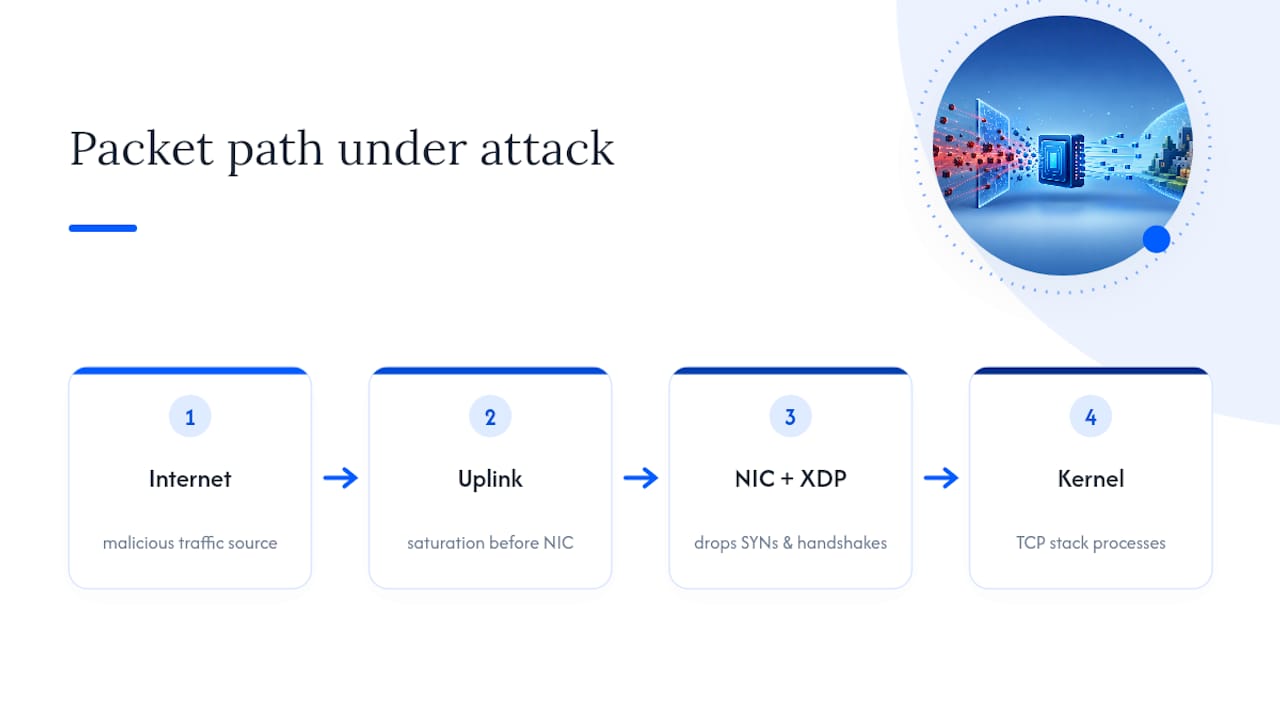
Running XDP requires Linux kernel 5.15 or newer and NIC driver support for the feature. Memory for connection-tracking maps needs sizing ahead of time, and you need a fallback mode if the map fills during a real attack. Deploy it on the host that actually terminates traffic, whether that's your proxy or edge server, and keep a static allow-list for your own management IPs so you don't lock yourself out mid-incident.
Building a Firewall and Server Config That Actually Holds
Four changes cover most of what a Minecraft server needs, and none of them require exotic tooling.
- Firewall the backend so port 25565 only accepts connections from your proxy's IP ranges, using nftables or iptables rules keyed to those CIDR blocks.
- Disable the UDP query protocol (
enable-query=false) unless a server list tool genuinely requires it. Community guides point to it as free amplification surface removed with one config line. - Set connection-throttle values in your Paper or Spigot configuration to cap how fast a single IP can open new connections.
- Run Fail2ban or an equivalent watching your server logs, banning IPs that hit repeated failed logins or reconnect floods within a short window.
Anti-bot plugins fill the gap none of the above touch: fake players that complete the handshake but never actually play. Look for a plugin that can challenge suspicious connections, verify against known bot-net signatures, and rate-limit joins per IP without adding noticeable delay to real players logging in.
Pro Tip: Test your connection-throttle setting against a friend joining from a different network before an attack happens. Too aggressive, and it will lock out real players on shared connections like campus Wi-Fi or mobile carriers.
Detecting and Responding to an Active Attack
Sudden spikes in SYN rate, new connection counts, or bandwidth use are the earliest signals, and monitoring guides recommend alerting on jumps rather than waiting for players to complain about lag.
Once an attack is confirmed:
- Enable your provider's mitigation mode or contact support immediately if it's not automatic.
- Post a status update to players so they know it's an attack, not a broken server.
- Preserve logs from the incident window for later analysis.
- Rotate your IP and rebuild DNS if the origin address was ever exposed.
- Tighten plugin rate limits temporarily to reduce load while mitigation kicks in.
Afterward, review which layer failed first, check for any DNS or config leak that gave attackers your real IP, and document the fix so the same gap doesn't reopen next time.
When Does It Make Sense to Choose Managed Hosting?
Some hosting providers build infrastructure tailored for gamers and high-performance workloads, integrating DDoS mitigation as a core feature rather than an afterthought. It's part of the same stack that handles the low-latency, high-workload demands Minecraft servers put on hardware.
- Some servers pair built-in DDoS protection with high-speed processors optimized for performance demands beyond general web hosting.
- Support services operating 24/7, with full file access and personal backups help reduce lockout risks during incidents.
- Users keep operational control while offloading scrubbing and network-layer defense to infrastructure designed to handle it.
The decision point is simple: if you're facing recurring attacks, don't want to manage XDP configs and firewall rules yourself, or need someone answering at 3 a.m. when an attack starts, an integrated host removes that burden entirely.
What I'd Actually Tell a Server Owner
Community servers overbuild this. Proxy, anti-bot plugin, firewall locked to proxy ranges. That's genuinely enough for most communities under a few hundred concurrent players. Large networks need the hybrid: edge proxy plus host scrubbing plus XDP on the proxy layer itself, not the game server. Where you host matters as much as what you configure. A low-latency location with responsive support saves you more downtime than another layer of DIY filtering ever will.
— Conal
Get DDoS Protection Built Into Your Hosting, Not Bolted On
Most of what this guide covers, proxies, firewall rules, kernel filters, plugin configs, is work you take on yourself. Nexonixhost is the alternative to stitching together five separate tools for one outcome: a server that stays online and stays fast under attack.
Some hosting providers include DDoS protection directly in gaming and high-performance hosting plans, using hardware selected for low latency rather than general-purpose workloads. Community managers may have full file access and personal backups to maintain server visibility without sole dependence on support tickets. Small business owners running Minecraft communities alongside other applications may receive integrated protection without managing separate infrastructures individually.
If recurring attacks or DNS leaks have already cost you uptime, check current plans on the Nexonixhost homepage and move your server onto infrastructure built for this from the start.
Sources
- FiveM Sentinel (XDP + L7 layering) - GitHub
- DDoS protection for Minecraft server hosts: the complete guide | Flowtriq Blog
- How to Protect Your Minecraft Server from DDoS
FAQ
How Do I Protect My Minecraft Server from DDoS?
Put a reverse proxy in front of your server to hide the origin IP, firewall your backend to only accept traffic from proxy ranges, disable the UDP query protocol, and add an anti-bot plugin for join-flood attacks. Larger networks should add host-level scrubbing and consider XDP filtering on the edge host.
Is DDoS Protection Worth It for a Small Server?
Yes. A single volumetric attack can knock a server offline for hours, and basic protection (a proxy plus firewall rules) costs little in setup time compared to the downtime and player churn an unprotected server risks.
What Is Port 25565 Used For?
Port 25565 is the default port Minecraft's Java Edition uses for client-server connections, making it the primary target for both connection floods and UDP query-protocol attacks against a server.
Is a DDoS Attack Illegal?
Launching a DDoS attack against a server you don't own or have permission to test is illegal in most jurisdictions under computer-crime and unauthorized-access laws, regardless of the target's size or purpose.
Do I Need Both a Proxy and Host-Level Scrubbing?
Small community servers can often run safely on proxy protection alone. Larger networks facing frequent or large-scale attacks benefit from combining an edge proxy with host-level scrubbing, since scrubbing catches volumetric floods that exceed what a proxy alone absorbs.